Integrating Oracle Commerce Cloud with Woovi
Pix Plugin for OCC - Oracle Commerce Cloud
Summary
This document details the steps required to connect your e-Commerce platform, based on Oracle Commerce Cloud, to Woovi. The Woovi platform reconciles your Bank and your e-Commerce in real time. After connecting your account to Woovi, you can charge customers in real time with Pix QR Codes, send Payment Links, and manage charges, including refunds.
Note: This document assumes you already have an active Oracle Commerce Cloud environment.
1. Create a Registered Application in OCC
Go to <ambiente>.occa.ocs.oraclecloud.com/occs-admin/#/settings/webAPI and create a new application for Woovi
2. Create a new Oracle-type Application in Woovi
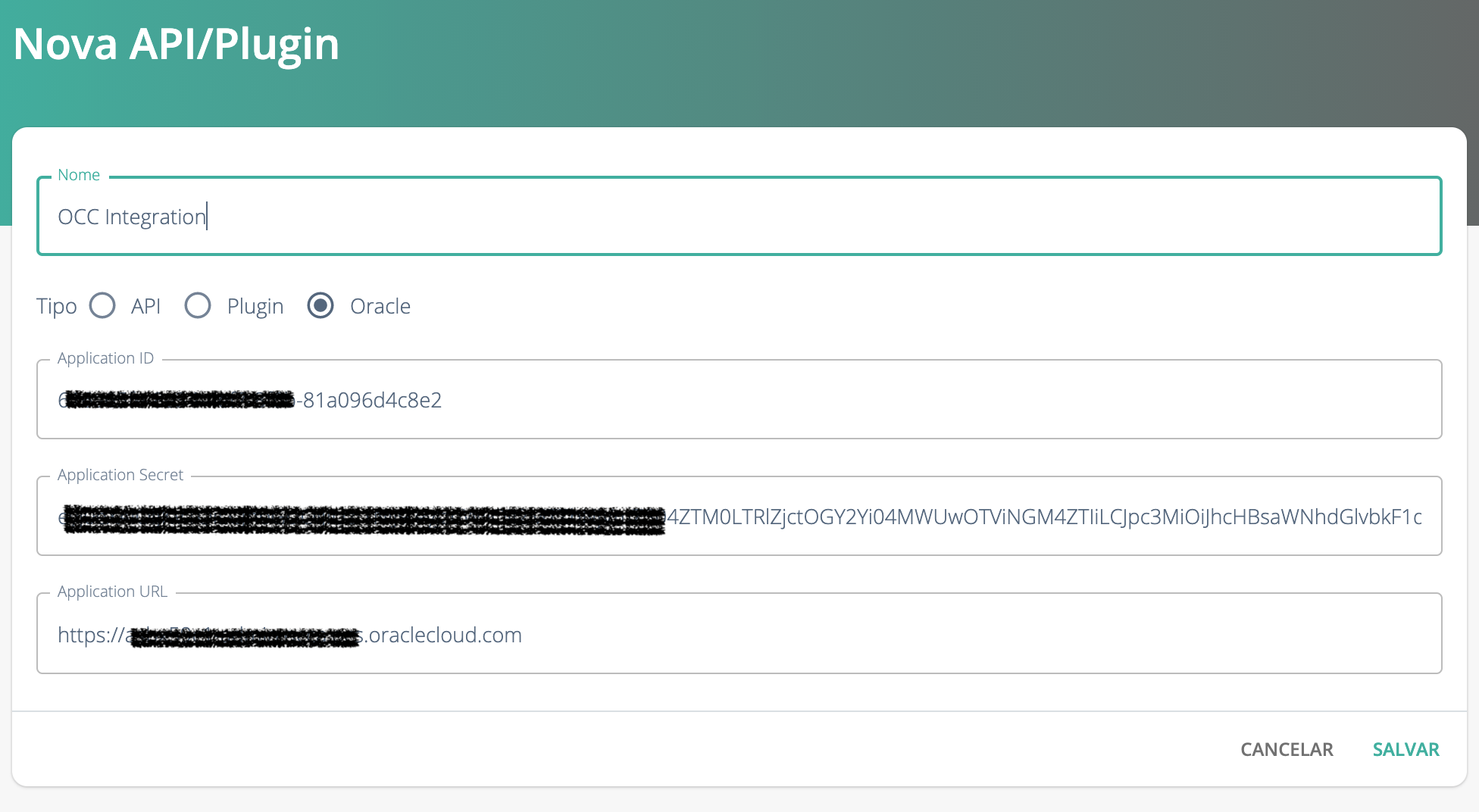
Choose the Oracle type for the Woovi Application. Register the Application ID, the Application Secret and the URL of your Oracle Commerce Cloud instance. On save, the Generic Payments Webhooks will be registered automatically.
3. Install the Woovi Plugin on your Oracle Commerce Cloud instance
Talk to your integrator to add the Woovi extensions and widgets to your Storefront
System requirements
- Oracle Commerce Cloud 18D and above
- Be an active Woovi customer.